How the Sales Process Works
Introduction
The Sales functionality in 1C:Gestión Integral allows companies to manage the entire commercial cycle, from defining the terms of cooperation with a customer to issuing invoices and controlling incoming payments.
Depending on the company's business processes, some documents may be optional. For example, it is possible to complete a sale without a customer contract or issue an invoice without creating a sales order. However, the system maintains links between documents to facilitate control and tracking of each operation.
General Process Overview
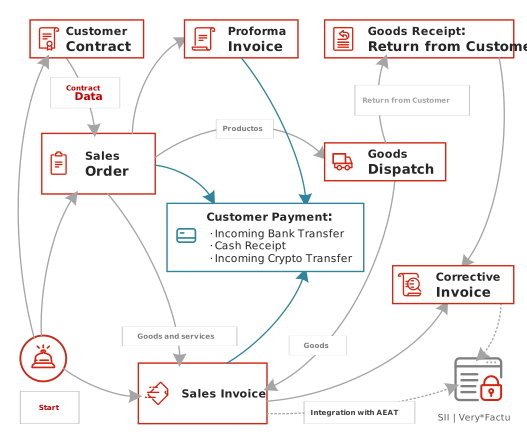
The diagram above illustrates the typical relationships between the main documents and operations involved in the sales process.
Main Documents in the Process
Customer Contract
A customer contract defines the commercial conditions agreed with the customer, such as payment methods, payment terms, discounts, and any other specific terms of the business relationship.
The use of contracts is optional and depends on each company's internal procedures and organizational requirements.
Sales Order
A sales order records the customer's intention to purchase products or services and serves as the starting point for planning and monitoring the commercial operation.
From a sales order, it is possible to generate other related documents, such as proforma invoices or sales invoices.
In addition, the sales order allows users to monitor the progress of the operation, including invoicing, payments, and product dispatches.
Proforma Invoice
A proforma invoice is an informational document that can be generated from a sales order to send to the customer or to request payment before the final invoice is issued.
Unlike a sales order, a proforma invoice does not participate in the operational tracking of the sale. It cannot be used to monitor invoicing status, payments, or product dispatches.
Its primary purpose is to provide the customer with a document showing the amount to be paid, especially in situations involving advance payments or partial payments for a sales order.
Sales Invoice
A sales invoice is the official fiscal document of the transaction and represents the customer's payment obligation.
Invoices may be generated from sales orders or created directly when required by the company's workflow.
Sales invoices can also be submitted to official electronic invoicing systems such as Veri*Factu.
Customer Payments
Customer payments can be recorded using different financial documents, such as incoming bank transfers, cash receipts, or incoming cryptocurrency transfers.
Payments may be recorded either before or after the corresponding invoice is issued. Afterwards, payments can be linked to invoices in order to monitor outstanding balances and the status of customer settlements.
Returns and Corrective Invoices
When it is necessary to correct a completed transaction, the system allows users to register product returns and issue corrective invoices linked to the original invoices.
These operations ensure the proper update of balances and tax information.
Common Business Scenarios
Complete Sales Cycle
Customer Contract → Sales Order → Sales Invoice → Customer Payments
This is the most comprehensive scenario and provides the highest level of control over the commercial operation.
Sale Without a Contract
Sales Order → Sales Invoice → Customer Payments
This scenario is common for one-time sales of products or services when commercial conditions are publicly available and do not require a separate agreement with the customer.
For example, an accounting or tax advisory firm may offer services with predefined pricing. In this case, it is sufficient to create a sales order, select the appropriate price type, and send the document to the customer for approval or payment without signing a separate contract.
Sale Without a Sales Order
Sales Invoice → Customer Payments
This scenario is used when a sale is recorded directly without a prior planning stage.
Advance Payment
Customer Payments → Sales Invoice
In certain situations, a payment may be recorded before the corresponding invoice is issued, and both operations can be linked later.
Using a Proforma Invoice
Optionally, a proforma invoice can be generated from a sales order to request payment before the final invoice is issued.
Process Monitoring
The system allows users to monitor the status of all commercial and financial operations related to sales at any time.
Among other things, it is possible to track:
- Pending sales orders.
- Invoices awaiting issuance.
- Invoices awaiting payment.
- Unlinked payments.
- Overdue customer debts.
The traceability between documents provides quick access to all information related to a transaction and makes it easy to determine its current status.
Related Articles
- Customers and Contracts
- Sales Order
- Goods Dispatch
- Service Provision Control
- Sales Invoice
- Customer Payments
- Sales Reports